Notice
Recent Posts
Recent Comments
Link
| 일 | 월 | 화 | 수 | 목 | 금 | 토 |
|---|---|---|---|---|---|---|
| 1 | 2 | 3 | 4 | |||
| 5 | 6 | 7 | 8 | 9 | 10 | 11 |
| 12 | 13 | 14 | 15 | 16 | 17 | 18 |
| 19 | 20 | 21 | 22 | 23 | 24 | 25 |
| 26 | 27 | 28 | 29 | 30 |
Tags
- CAN통신
- 온디바이스AI
- yolov11
- error
- CAN-FD
- 비동기추론
- 이미지증강
- Classification
- yolov8-cls
- ComputerVision
- r-net
- wandb
- bytetrack
- p-net
- ObjectTracking
- o-net
- 기울기소실
- 논문리뷰
- opencv템플릿매칭
- MTCNN
- AI
- Vanishing Gradient
- wandb끄기
- OpenCV
- opencv설치
- YOLO
- 컴퓨터비전
- adb
- easyocr
- pyside6
Archives
- Today
- Total
공부저장소
OpenCV 템플릿 매칭 본문
OpenCV 템플릿 매칭이란?
입력 이미지와 템플릿(template) 이미지를 입력 받아 입력 이미지에서 템플릿 이미지를 찾는 것
템플릿 매칭을 위해 matchemplate 함수 사용
-> cv2.matchTemplate(image, templ, method)
- image: 입력 이미지
- templ: 템플릿 이미지
- method: 매칭 방법. 이에 따라 유사도 계산 방법 달라짐
템플릿 매칭 방법(총 6개)
- TM_SQDIFF/ TM_SQDIFF_NORMED
- 0에 가까울수록 매칭 잘됨
- 작을수록 매칭 좋음, 밝기 변화에 민감 (NORMED가 조금 더 안정)
- TM_CCORR
- 클수록 매칭 좋음, 밝기(스케일)에 민감
- TM_CCORR_NORMED
- 0~1
- 1에 가까울수록 좋음
- 스케일 변화엔 강하지만 밝기 오프셋은 못 없앰
- TM_CCOEFF
- 클수록 좋음
- 평균 제거로 밝기 오프셋에 강함
- TM_CCOEFF_NORMED
- -1~1
- 1에 가까울수록 좋음
- 오프셋/스케일 모두 정규화 → 실무에 제일 많이 사용됨
요약:
- SQDIFF → 작을수록 매칭
- CCORR / CCOEFF → 클수록 매칭
- 오프셋: 데이터 전체에 같은 값을 더하거나 빼서 평균만 바꾸는 것
실습해보자!
import cv2
import numpy as np
from google.colab.patches import cv2_imshow

image = cv2.imread('/content/One_UI_4_홈화면.jpg')
template = cv2.imread('/content/스크린샷 2025-09-05 105151.png')

cv2_imshow(template)

img_draw = image.copy()
th, tw = template.shape[:2] # 템플릿 높이/넓이 가져오기

res = cv2.matchTemplate(image, template, cv2.TM_CCOEFF_NORMED)

min_val, max_val, min_loc, max_loc = cv2.minMaxLoc(res) # 매칭 결과에서 최소/최대값이랑 좌표 추

top_left = max_loc # 최적 매칭 위치
match_val = max_val # 매칭 정확도 값

bottom_right = (top_left[0] + tw, top_left[1] + th)
cv2.rectangle(img_draw, top_left, bottom_right, (0,0,255),2)
cv2.putText(img_draw, str(match_val), top_left, cv2.FONT_HERSHEY_PLAIN, 2,(0,255,0), 1, cv2.LINE_AA)
cv2_imshow(img_draw)

cv2.waitKey(0)
cv2.destroyAllWindows()
하나의 이미지에서 3개의 템플릿 예측 -> 중심 좌표값 추출
import cv2
import numpy as np
from google.colab.patches import cv2_imshow

image = cv2.imread('/content/One_UI_4_홈화면.jpg')
template = [
    cv2.imread('/content/스크린샷 2025-09-05 110629.png'),
    cv2.imread('/content/스크린샷 2025-09-05 105151.png'),
    cv2.imread('/content/스크린샷 2025-09-05 112641.png')
]

template_img_list = []
for t in template:
    template_img_list.append(cv2.resize(t, (40,40)))

img_draw = image.copy()

for i in template_img_list:
  cv2_imshow(i)

for i in template_img_list:
    th, tw = i.shape[:2]

    res = cv2.matchTemplate(image, i, cv2.TM_CCOEFF_NORMED)

    min_val, max_val, min_loc, max_loc = cv2.minMaxLoc(res)

    top_left = max_loc
    match_val = max_val

    bottom_right = (top_left[0] + tw, top_left[1] + th)
    cv2.rectangle(img_draw, top_left, bottom_right, (0,0,255), 2)
    cv2.putText(img_draw, f"{match_val:.2f}", top_left,
            cv2.FONT_HERSHEY_PLAIN, 2, (0,255,0), 1, cv2.LINE_AA)

    center_x = top_left[0] + tw // 2
    center_y = top_left[1] + th // 2
    center = (center_x, center_y)

    print("중심좌표:", center)
    cv2.circle(img_draw, center, 5, (255,0,0), -1)

cv2_imshow(img_draw)

cv2.waitKey(0)
cv2.destroyAllWindows()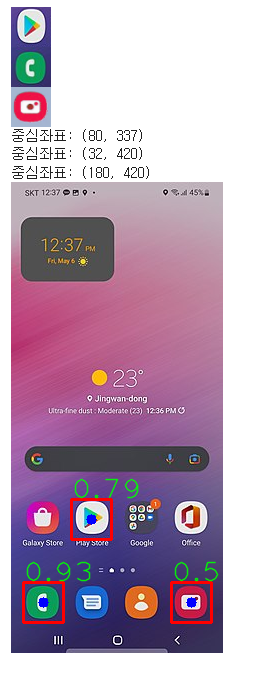
'PYTHON' 카테고리의 다른 글
| Pyside6 designer사용해서 UI 만들어보기 (3) | 2025.08.25 |
|---|
'PYTHON' Related Articles
more
